ecom (Pepperl+Fuchs)
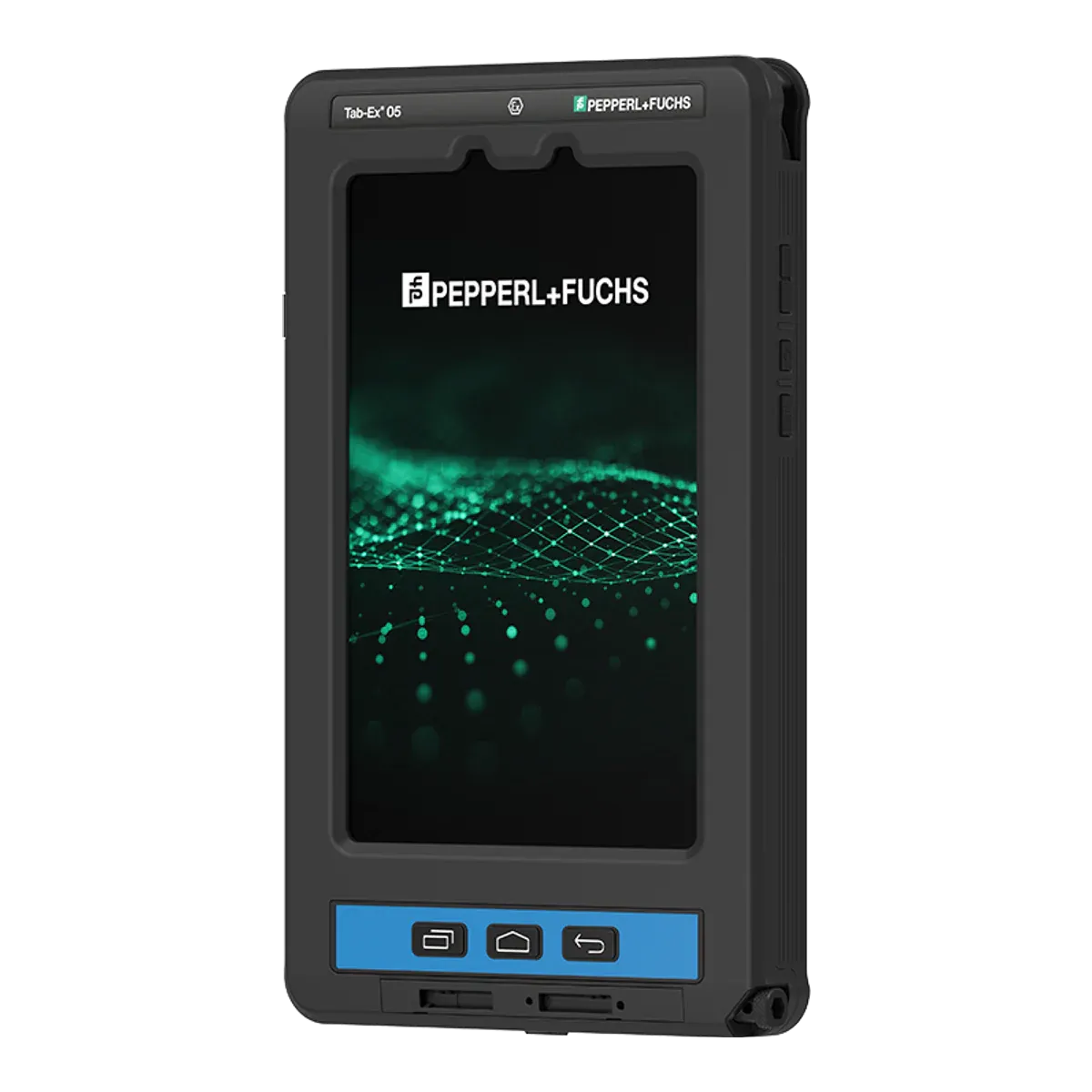
ecom Tab-Ex 05 DZ1
- Zone 1/21
- IIC T6
- ATEX + IECEx
- Class I Division 1
Compare · iPad or Android for Zone 1
Both of these tablets are flameproof (Ex db) and certified for Zone 1/21 at IIC T6, the strictest temperature class, so on the gases they may be used around they start level. The ecom Tab-Ex 05 DZ1 is a dedicated 8-inch Android tablet with ATEX and IECEx certificates, a Class I Division 1 listing for North America and a +55 °C ambient rating. The Xshielder iPad Pro 11-inch is a flameproof cover around a standard iPad Pro 11-inch (M5), with cameras and LiDAR that work through the cover, but it is ATEX only and rated to +45 °C. Here is how they compare, and which we would choose for which team.
ecom (Pepperl+Fuchs)
Xshielder
Our verdict
The certificate decides first. If you need IECEx or a North American listing, work in ambient heat above +45 °C, or want the lighter tablet with an alarm key and an Ex-approved scanner, we would choose the ecom Tab-Ex 05 DZ1. If your Zone 1 crews document their work with photos, LiDAR scans and marked-up drawings, or you already run iPads, and your sites fit an ATEX certificate and +45 °C, we would choose the Xshielder iPad Pro 11-inch.
Key differences
The certificate decides whether a tablet may be used on a hot site at all. The ecom Tab-Ex 05 DZ1 has 10 °C more headroom than the Xshielder iPad Pro 11-inch, so check the summer ambient of your plant or yard against the certificate.
ecom publishes ATEX and IECEx certificate numbers and a North American listing for the ecom Tab-Ex 05 DZ1. Xshielder confirms ATEX certification for the Xshielder iPad Pro 11-inch but has published no certificate number yet, and IECEx is planned. If your site or client needs IECEx or a Division listing, this decides the choice.
The ecom Tab-Ex 05 DZ1 is 228 g lighter than the Xshielder iPad Pro 11-inch, which weighs 1,350 g including the iPad. You notice the gap on a strap or in one hand through a shift.
The Xshielder iPad Pro 11-inch has the iPad Pro’s LiDAR scanner, and Xshielder confirms it works through the cover. Our data lists no depth sensor for the ecom Tab-Ex 05 DZ1. For room scans and measurements in Zone 1, that decides it.
In the field
Edge: ecom Tab-Ex 05 DZ1
On the core rating they match. Both are flameproof (Ex db), certified for Zone 1/21 with gas group IIC, T6 (85 °C) and dust T80 °C at protection level Gb/Db, and neither is certified for Zone 0. The ecom Tab-Ex 05 DZ1 adds an intrinsically safe circuit (Ex ia) for its USB-C port and S Pen. Where they part is the paperwork. ecom publishes ATEX EPS 24 ATEX 1 228 X and IECEx EPS 24.0082X, and lists approvals for Korea, Brazil and South Africa. Xshielder confirms ATEX certification but has published no certificate number yet, and IECEx is planned.
Heat and geography follow. The ecom Tab-Ex 05 DZ1 is certified from −20 °C to +55 °C, ten degrees above the Xshielder iPad Pro 11-inch at −20 °C to +45 °C, so a hot plant or a summer yard is its ground. For North America, ecom holds an SGS certificate for Class I Division 1 Groups A to D at T6, plus Class II Division 1 and Class III, while our data has no North American listing for the Xshielder iPad Pro 11-inch. On an ATEX site below +45 °C the gas and dust coverage is the same.
Edge: Xshielder iPad Pro 11-inch
This is where the Xshielder iPad Pro 11-inch pulls ahead, because the tablet inside is a standard iPad Pro 11-inch (M5). Its 11-inch Ultra Retina XDR screen is 2420 × 1668 at up to 1,000 nits (SDR maximum), against 8 inches, 1920 × 1200 and 600 nits on the ecom Tab-Ex 05 DZ1, which ecom says reads well in direct sunlight. Xshielder confirms that the 12 MP rear camera with 4K video and ProRes, the LiDAR scanner, the 12 MP front camera with Face ID, stylus input and the speakers and microphones all work through the cover.
The ecom Tab-Ex 05 DZ1 has a 13 MP autofocus rear camera, a 5 MP front camera, 4K video at 30 fps and a Samsung S Pen that is named in its certificate. Our data lists no depth sensor for it, so 3D scanning is not possible on it. It also comes in a camera-free version for sites that ban cameras, and our data lists none for the Xshielder iPad Pro 11-inch. For inspection photos, room scans and video calls with an expert, the Xshielder iPad Pro 11-inch is the more capable single device. The Ex rating of Xshielder’s stylus is not stated.
Edge: ecom Tab-Ex 05 DZ1
The ecom Tab-Ex 05 DZ1 weighs 1,122 g, 228 g less than the Xshielder iPad Pro 11-inch at 1,350 g including the iPad. ecom rates it IP68 (its Brazilian Inmetro marking shows IP64) and lists MIL-STD-810H, with glove touch and wet-hands operation. The Xshielder iPad Pro 11-inch’s IP65 rating is pending testing, and our data lists no ruggedness standard or glove-touch figure for it, which means unverified, not absent.
On controls, ecom’s programmable function key can be set to push-to-talk, an emergency call or an alarm. The Xshielder iPad Pro 11-inch has no programmable hardware key, so push-to-talk and lone-worker alerts run through third-party apps, and our data lists no built-in emergency function. Scanning follows the same pattern: ecom’s Ident-Ex 02 wireless 1D/2D scanner has its own Ex approval for Zone 1/21 and Division 1, where the Xshielder iPad Pro 11-inch scans by camera app with no scan engine. The ecom Tab-Ex 05 DZ1 also reads NFC tags.
Even
These are different ecosystems. The ecom Tab-Ex 05 DZ1 runs Android (Samsung One UI) on an Exynos 1380 with 6 GB of RAM and 128 GB of storage, and is Android Enterprise Recommended with Samsung Knox 3.10; our data flags its exact Android version as unconfirmed. The Xshielder iPad Pro 11-inch runs iPadOS 27 on an M5 with 12 or 16 GB, depending on storage, with the same apps and Apple device management as any iPad. Neither runs Windows desktop software.
On updates we call it level. ecom states security updates until 2032, a date our data flags as unconfirmed, and Xshielder expects 7–8 years, based on previous iPad Pro support. Neither battery is user-replaceable, and both must be swapped outside the hazardous area. ecom charges outside the hazardous area only; our data has no value for charging the Xshielder iPad Pro 11-inch inside the zone, so confirm that before you plan around it. ecom quotes up to 14 hours and our data lists up to 10 hours of web or video on Wi-Fi for the Xshielder iPad Pro 11-inch; these are makers’ figures measured in different ways, so test your own workload.
Specifications
 ecom Tab-Ex 05 DZ1 ecom Tab-Ex 05 DZ1 | 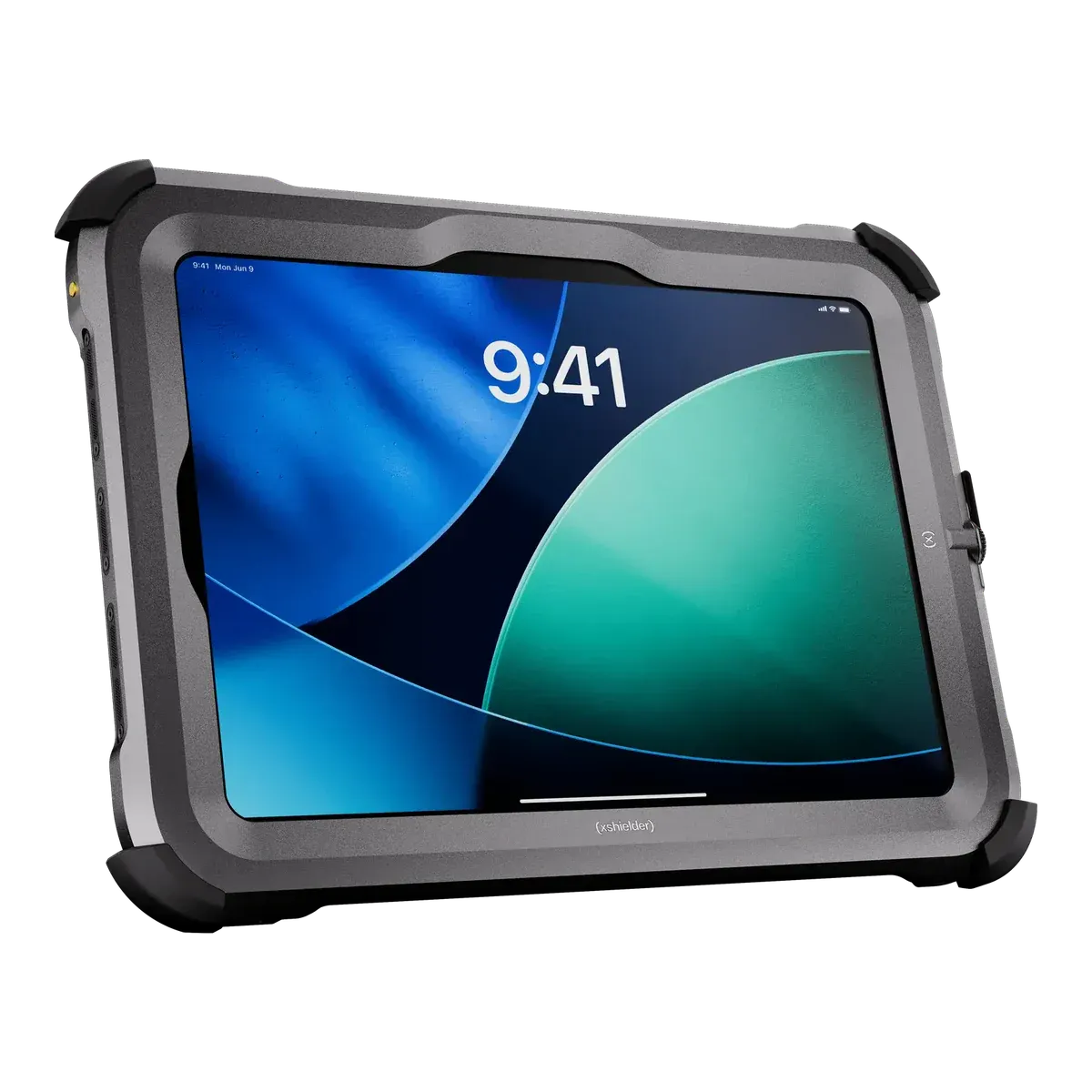 Xshielder iPad Pro 11-inch Xshielder iPad Pro 11-inch | |
|---|---|---|
| Ex rating | ||
| Certified for | Zone 1/21 | Zone 1/21 |
| Protection | Flameproof enclosure (Ex db) with an intrinsically safe circuit (Ex ia) | Flameproof enclosure (Ex db) |
| Gas group | IIC | IIC |
| Temperature class | T6 (≤ 85 °C) | T6 (≤ 85 °C) |
| Certification | ||
| ATEX marking | II 2G Ex db ia IIC T6 Gb / II 2D Ex tb ia IIIC T80°C Db | II 2G Ex db IIC T6 Gb / II 2D Ex tb IIIC T80°C Db |
| ATEX certificate | EPS 24 ATEX 1 228 X | ATEX certified |
| IECEx marking | Ex db ia IIC T6 Gb / Ex tb ia IIIC T80°C Db | Not in our data |
| IECEx certificate | IECEx EPS 24.0082X (issue 1, 2025-08-05 | Not in our data |
| Other approvals | KC Korea 25-KA4BO-0326X (gas) and 25-KA4BO-0327X (dust) (ecom files CERT-7928/7929); Inmetro Brazil TÜV 25.0140 X (CERT-7842; marking adds IP64); IA/MASC South Africa MASC S/25-8018X; Common Criteria portal listing for the Tab-Ex family | Lanyard hole to NS-9611 (pending testing) |
| North America | SGS certificate SGSNA/25/CA/00003X (ecom file CERT-7841): Class I Division 1, Group A, B, C, D, T6; Class II Division 1, Group E, F, G T80C; Class III T80C; Ex db ia IIC T6 Gb; Class I, Zone 1, AEx db ia IIC T6 Gb; Zone 21, Group IIIC T80C; Ta −20 °C to +55 °C | Not in our data |
| Protection level (EPL) | Gb / Db | Gb / Db |
| Dust group | IIIC | IIIC |
| Max surface temperature (dust) | 80 °C | 80 °C |
| Safe use | ||
| Ambient temperature (Ta) | −20 °C to +55 °C | −20 °C to +45 °C |
| Charging | Outside the hazardous area only | Not in our data |
| Battery swap | Outside the hazardous area only | Outside the hazardous area only |
| Ports and accessories in the zone | SIM and microSD are reachable only in non-hazardous areas (flameproof cover). The USB-C port is intrinsically safe and may be used for wired data connections in the hazardous area within its entity parameters (Uo 5.6 V, Io 500 mA, Po 600 mW, Co 1 µF, Lo 1 µH); charging via USB-C only in non-hazardous areas. The S Pen is intrinsically safe and may be used in the hazardous area. Wireless peripherals (Bluetooth, DeX) are not restricted by the certificate text. | Not in our data |
| Certified accessories | Named in the certificate: S Pen ST T05 X2, leather case LC T05 X1, chest harness CH T05 X1, belt clip BC T01, carrying strap CS T05, stylus tether ST 01. The Ident-Ex 02 wireless 1D/2D scanner carries its own Ex approval (Zone 1/21, Div 1). Chargers, docks and holders on the ecom page are for use outside the hazardous area only. | Xshielder Stylus (capacitive, 22 g, aluminium, with lanyard). Ex rating of the stylus not stated. Apple Pencil not mentioned.Unconfirmed, see note 1 |
| Operating temperature | −20 °C to +55 °C | −20 °C to +45 °CUnconfirmed, see note 2 |
| Conditions of use | IECEx X conditions: flameproof joints shall not be repaired; protect against high-energy impacts; do not use near processes producing high electrostatic charges; charging and SIM/SD-card replacement only in ordinary (non-hazardous) locations; charge only at −5 °C to +55 °C; charging and wired data via USB-C limited to Um 30 V (and the certificate's current limit) and from a SELV/PELV/ES1 supply; user may replace only the USB-C cover; repairs by the manufacturer or an authorised service centre. | Not in our data |
| Device | ||
| Type | Dedicated Ex tablet | Certified Ex case |
| Tablet inside | Not in our data | iPad Pro 11-inch (M5) |
| Also fits | Not in our data | iPad Pro 11-inch (M4) |
| Fitting | Not in our data | Fitted by the makerUnconfirmed, see note 3 |
| Tablet can be removed | Not in our data | Yes, but only by Xshielder authorised personnel (lid glued on the ATEX version)Unconfirmed, see note 3 |
| Launched | 2025 | 2026 |
| Part numbers | TAB-EX05-DZ1-* (datasheet 480996; WiFi and WWAN types) | XS1-TB-G01-C01-S01; datasheet ref. iPad11P-000033-1 |
| Operating system | Android 16Unconfirmed, see note 4 | iPadOS 27 |
| Edition | Android (Samsung One UI); Android Enterprise Recommended, Samsung Knox 3.10 | iPadOS (consumer; no LTSC or enterprise edition) |
| OS at launch | Android 14 | iPadOS 26 |
| OS upgrades | Android 22 (ecom claim)Unconfirmed, see note 4 | Still supported by iPadOS 27 (current) |
| Security updates | Until Q1 2032Unconfirmed, see note 5 | 7–8 years (based on previous iPad Pro support) |
| Processor | Samsung Exynos 1380 (S5E8835) octa-core, 4 x 2.4 GHz + 4 x 2.0 GHz, 5 nm | Apple M5 (up to 10-core CPU) |
| Processor architecture | Arm | Arm |
| Memory (RAM) | 6 GB | 12 (256/512 GB) / 16 (1/2 TB) |
| Storage | 128 GB, microSD up to 1 TB | 256 GB, 512 GB, 1024 GB, 2048 GB |
| What works through the housing or case | ||
| Face ID / Touch ID | Not in our data | Yes: Face ID works through the cover (confirmed by Xshielder) |
| Apple Pencil / stylus | Not in our data | Yes: stylus input works through the cover (confirmed by Xshielder); Xshielder capacitive stylus (22 g, interchangeable tips, lanyard) offered |
| Side and volume buttons | Not in our data | Yes: usable through the cover (Xshielder: all iPad Pro functions available) |
| Rear cameras | Not in our data | Yes: 12 MP Wide camera with 4K video and ProRes works through the cover (confirmed by Xshielder) |
| LiDAR | Not in our data | Yes: LiDAR works through the cover (confirmed by Xshielder) |
| Front camera | Not in our data | Yes: landscape 12 MP Center Stage camera with Face ID works through the cover (confirmed by Xshielder) |
| Touchscreen | Not in our data | Yes: works through the cover (Xshielder: all iPad Pro functions available) |
| Charging | Not in our data | USB-C charging as on a standard iPad Pro (confirmed by Xshielder); 50% in 30 min with a 60 W adapter (M5); no wireless |
| Speakers and microphones | Not in our data | Yes: all 4 microphones and 4 speakers usable (confirmed by Xshielder) |
| Headset audio | Not in our data | Yes: audio in and out works (confirmed by Xshielder); headsets via USB-C or Bluetooth, as the iPad Pro has no 3.5 mm jack |
| USB-C port | Not in our data | Yes: accessible for charging and data, as on a standard iPad Pro (confirmed by Xshielder) |
| SIM card | Not in our data | eSIM only (1 x eSIM, cellular models); no SIM tray |
| Removed or disabled | Not in our data | Nothing removed or disabled: all iPad Pro features available (confirmed by Xshielder) |
| Mounting points | Not in our data | 1/4-inch tripod mount; lanyard hole to NS-9611 (pending testing) |
| Field capabilities | ||
| Push-to-talk | Via app (programmable function key assignable to PTT, per ecom) | Via app (third-party PTT apps over Wi-Fi/cellular; no PTT key; Ex-rated? n/a) |
| Emergency / SOS | Built in (freely programmable function key, e.g. emergency call or alarm) | Not in our data |
| Lone worker | Via app (key assigned to alarm/emergency; third-party or ecom lone-worker solution) | Via app (third-party lone-worker apps) |
| Barcode scanning | Via accessory (ecom Ident-Ex 02 wireless 1D/2D scanner; Ex-rated? yes) or camera-based via app | Via app (camera-based scanning; no scan engine) |
| NFC reading | Built in (NFC) | Not possible (no NFC reader on any iPad)Unconfirmed, see note 6 |
| 3D scanning / LiDAR | Not possible (no depth sensor listed) | Built in (iPad Pro LiDAR); Xshielder lists 'Pro camera with LiDAR' |
| Remote expert / video calls | Via app (front and rear cameras, Google ARCore ready; ecom promotes remote-support use) | Via app (FaceTime, Teams or remote-assist apps; cameras and audio work through the cover) |
| Windows desktop software | Not possible (Android; Samsung DeX gives a desktop-style Android UI) | Not possible (iPadOS only) |
| Bluetooth gas detectors | Not in our data | Via app (Bluetooth 6 (M5) / 5.3 (M4); vendor app; no maker-certified integration listed) |
| Display and camera | ||
| Display | 8-inch TFT, capacitive multitouch, 60 Hz / adaptive up to 120 Hz; Corning Gorilla Glass 3 (DZ1/DZ2), Gorilla Glass 5 (D2) | 11-inch Ultra Retina XDR tandem OLED, ProMotion 10-120 Hz, P3, True Tone, antireflective coating; nano-texture glass option on 1 and 2 TB |
| Resolution | 1920 × 1200 (WUXGA), 283 ppi, 16:10 | 2420 × 1668 (264 ppi) |
| Brightness | 600 nits | 1000 (SDR max) |
| Outdoor readability | Maker claims optimum readability in direct sunlight (600 nits max) | Not in our data |
| Touch | Yes: glove touch and wet-hands operation (maker) | Not in our data |
| Pen / stylus | Samsung S Pen included (pressure sensitive), with Tab-Ex S Pen holder | Apple Pencil Pro, Apple Pencil (USB-C); magnetic attach and charge, hover |
| Rear camera | 13 MP autofocus, 8x digital zoom (camera-free version available) | 12 MP Wide, f/1.8, True Tone flash |
| Front camera | 5 MP | 12 MP Center Stage, landscape, TrueDepth (Face ID) |
| Video | UHD 4K (3840 x 2160) at 30 fps | 4K video, ProRes |
| Depth sensing | Not in our data | LiDAR scanner |
| Connectivity | ||
| Network | 5G Sub-6 and 4G LTE; Wi-Fi-only version also available | Wi-Fi only or Wi-Fi + Cellular (5G sub-6 GHz) |
| Wi-Fi | Wi-Fi 6 (802.11 a/b/g, Wi-Fi 4/5/6 2.4 + 5 GHz) | Wi-Fi 7 (802.11be), 2x2 MIMO |
| Bluetooth | Bluetooth 5.3 | Bluetooth 6 |
| NFC | Yes | Not in our data |
| Satellite positioning | GPS, Glonass, Beidou, Galileo | GPS/GNSS on Wi-Fi + Cellular models; digital compass and Wi-Fi location on all |
| SIM | Nano-SIM and eSIM (optional) | eSIM only (cellular models) |
| Physical and power | ||
| Weight | 1122 g | 1350 g (including the tablet) |
| Dimensions | 161.5 × 262.75 × 25.75 (W × H × D) mm | 289 × 217 × 16 mm |
| Ingress protection | IP68 | IP65 (pending testing)Unconfirmed, see note 7 |
| Ruggedness | MIL-STD-810H | Not in our data |
| Battery | 5050 (typical) | 8160Unconfirmed, see note 8 |
| Battery energy | 18.87 (typical) | 31.29 |
| Battery life | Up to 14 h | Up to 10 hours web or video on Wi-Fi |
| Hot-swap battery | Not in our data | No |
| Replaceable battery | No | No |
| Ports and expansion | USB 2.0 Type-C; 3.5 mm audio jack and POGO pins on DZ2; microSD; nano-SIM / eSIM | Thunderbolt / USB 4 (USB-C, up to 40 Gb/s); Smart Connector; magnetic Apple Pencil connector |
| Docking | DZ2: Lite Cradle, DC T01 X2 desktop charger, passive holder with tilt/swivel (ordinary areas) | USB-C hubs and docks; Smart Connector or magnetic keyboard accessories where the iPad has them. Not usable through sealed Ex cases except the USB-C or Lightning charging port where the case exposes it. |
| Keyboard | No keyboard; wireless DeX with Bluetooth keyboard/mouse; POGO keyboard-dock port on DZ2 (ordinary areas only) | Smart Connector (Magic Keyboard for iPad Pro) |
| Controls & Accessibility | ||
| Keys | Function key (programmable: PTT, emergency call, alarm) and Active button | Top button (no Touch ID; Face ID model), volume buttons; no programmable hardware key |
| Push-to-talk key | Yes | No |
| Glove touch | Yes | Not in our data |
| Biometrics | Face recognition; fingerprint only on the D2 model | Face ID |
| Fleet and support | ||
| Manufacturer | ecom instruments (Pepperl+Fuchs), Germany | Xshielder AS, Norway |
Only values we could check are listed; “Not in our data” means we have not verified it, not that the tablet lacks it. A numbered marker means a value is unconfirmed, and the matching note at the foot of the page explains why. Prices are on request for both.
Keep researching
Xshielder
A flameproof cover for the iPad Pro 11-inch (M5), certified IIC T6 for Zone 1/21 under ATEX, with the cameras, LiDAR and stylus input working through the cover. Tell us about your site and fleet size to get a quote. See the iPad Pro 11-inch cover.
FAQ
Neither is better across the board. The ecom Tab-Ex 05 DZ1 suits hot sites up to +55 °C, teams that need IECEx or a North American listing, and crews who want the lighter tablet with an alarm key. The Xshielder iPad Pro 11-inch suits teams that want the iPad Pro’s screen, cameras and LiDAR in Zone 1/21 on an ATEX certificate. Both are IIC T6.
No. Both are certified to protection level Gb/Db, which covers Zone 1/21 and Zone 2/22, and neither is certified for Zone 0.
The ecom Tab-Ex 05 DZ1 is both: it holds IECEx EPS 24.0082X and an SGS listing for Class I Division 1 Groups A to D at T6. The Xshielder iPad Pro 11-inch is ATEX only. IECEx is planned, and our data has no North American listing for it.
On the makers’ own statements they are close. ecom states updates until 2032 for the ecom Tab-Ex 05 DZ1, a date our data flags as unconfirmed, and Xshielder expects 7–8 years for the Xshielder iPad Pro 11-inch, based on previous iPad Pro support.
For the ecom Tab-Ex 05 DZ1, no: it must be charged outside the hazardous area, and its battery is not user-replaceable. For the Xshielder iPad Pro 11-inch our data has no value for charging inside the zone, so it is not confirmed either way. Its battery swap is outside the hazardous area only.
Neither is intrinsically safe as a whole. Both are flameproof (Ex db) tablets. The ecom Tab-Ex 05 DZ1 adds an intrinsically safe circuit (Ex ia) for its USB-C port and S Pen, and the Xshielder iPad Pro 11-inch relies on the flameproof cover alone.
Prices depend on volume, configuration and region, so both are on request. Contact us for a price.
Facts last verified on against certificates, declarations of conformity and manufacturer data. The sources for each tablet are listed on its page: ecom Tab-Ex 05 DZ1 and Xshielder iPad Pro 11-inch. Always check the certificate for your exact model before use. Spotted an error? Tell us.