BARTEC
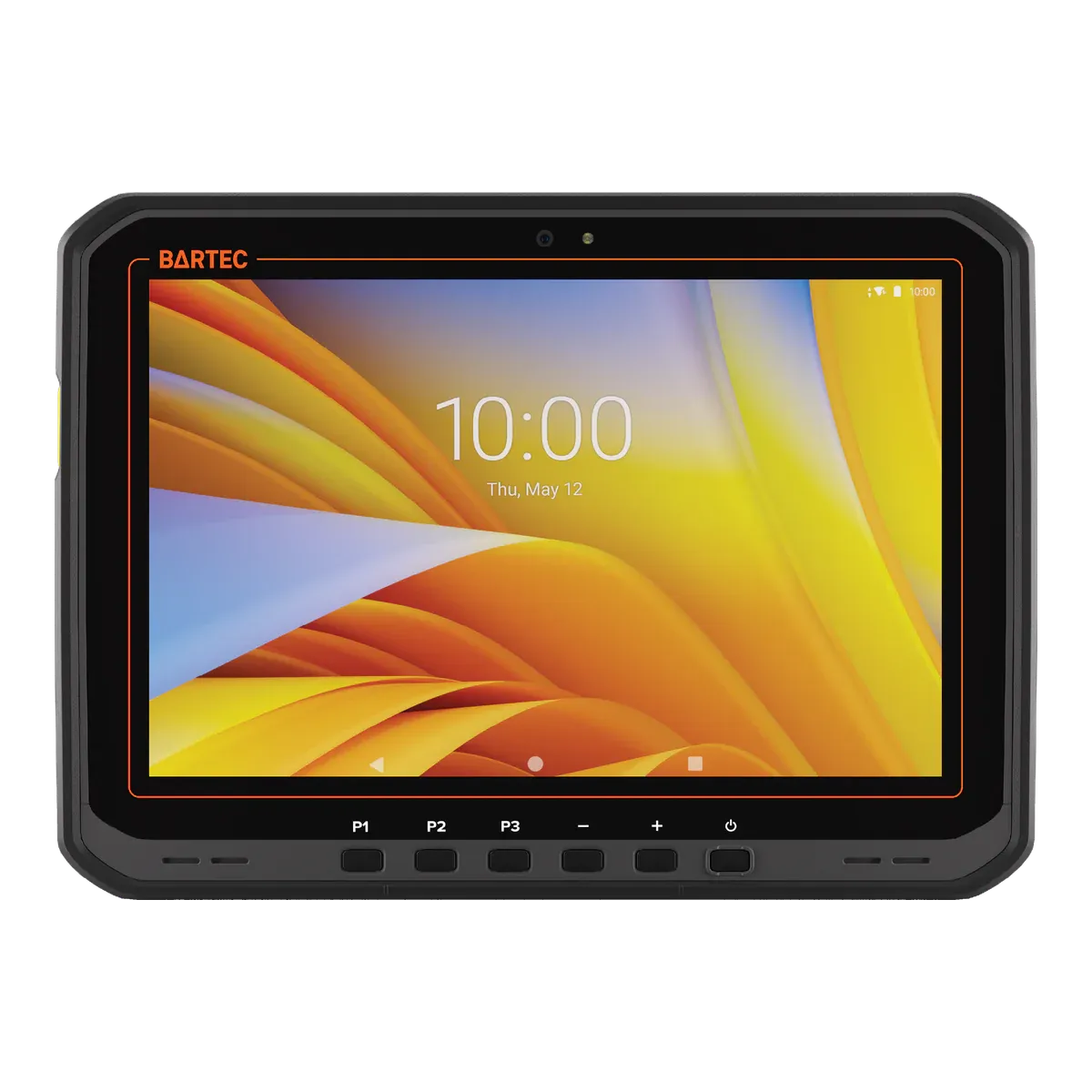
BARTEC ET60/65EX2 Android
- Zone 2/22
- IIC T4
- ATEX + IECEx
- Class I Division 2
Compare · Zone 2 Android tablets
These two 10.1-inch Android tablets match on most of the certificate: intrinsically safe (Ex ic), IIC T4 Gc, dust group IIIC at 135 °C, Zone 2/22 under ATEX and IECEx, −20 °C to +55 °C, and a North American Class I Division 2 listing (for the BARTEC, its North America types only). They also weigh almost the same, at 1,074 g and 1,059 g. The choice is in the work. The i.safe MOBILE IS940.2 may be charged inside the hazardous area and has a 50 MP camera. The BARTEC ET60/65EX2 Android has an optional built-in scan engine and a hot-swap battery. Neither may be used in Zone 1. Here is how they compare, and which we would choose for which team.
BARTEC
i.safe MOBILE
Our verdict
For long shifts, lone workers and photo documentation we would choose the i.safe MOBILE IS940.2: it is the only one of the pair that may be charged in the hazardous area, it has a freely programmable red key for SOS or lone-worker apps and a 50 MP camera, and i.safe states security updates until Q4 2032. For scan-heavy rounds we would choose the BARTEC ET60/65EX2 Android, with its optional built-in scan engine, hot-swap battery and 1,000-nit optically bonded screen.
Key differences
The i.safe MOBILE IS940.2 may be charged inside the hazardous area, within the certificate’s conditions and at 0 °C to +45 °C. The BARTEC ET60/65EX2 Android must be charged outside it. For crews who cannot leave the zone to charge, this can decide the choice.
The BARTEC ET60/65EX2 Android takes an optional built-in SE55 1D/2D scan engine, which suits all-day scanning. The i.safe MOBILE IS940.2 scans through its 50 MP camera with an app and lists no dedicated scan engine, which suits occasional scans.
The i.safe MOBILE IS940.2 has a freely programmable red key, for example for SOS or a lone-worker app. The BARTEC ET60/65EX2 Android has three programmable keys and no dedicated SOS key, so an alarm there runs through an app.
i.safe states security updates until Q4 2032 for the i.safe MOBILE IS940.2, a date our data confirms. For the BARTEC ET60/65EX2 Android, December 2031 is unconfirmed: it is Zebra’s date for the tablet it is built on, and BARTEC says it needs a LifeGuard service contract, so ask BARTEC what your contract covers.
In the field
Edge: i.safe MOBILE IS940.2
This is where the two part. The i.safe MOBILE IS940.2 may be charged in the hazardous area, within the certificate’s conditions, at 0 °C to +45 °C through its 12-pin dock interface, and i.safe lists the IS-DS940.1 dock for charging in the Ex area. Its USB-C and 16-pin ISM covers stay closed in Ex areas, though Ex-rated accessories such as a headset or push-to-talk button may use the 16-pin interface. The battery is user-replaceable, changed outside the hazardous area only.
The BARTEC ET60/65EX2 Android charges and swaps its battery outside the hazardous area only. Its 8920 mAh battery has hot swap through an internal supercapacitor, and its ports (USB-A, USB-C, dock, keyboard connector) may be used only if the atmosphere is shown to be absent. BARTEC states up to 10 hours indoors, and our data has no battery-life or hot-swap figure for the i.safe, so we do not compare runtime or battery capacity.
Even
The two split the data-capture work. The BARTEC ET60/65EX2 Android takes an optional SE55 1D/2D scan engine, which changes its Ex marking to “op is”. Its camera is a 16 MP autofocus unit with LED flash, with an 8 MP front camera and a mechanical privacy shade. The i.safe MOBILE IS940.2 has a 50 MP autofocus rear camera and a 5 MP fixed-focus front camera, and scans through the camera. Both have NFC.
Both screens are 10.1 inches with Gorilla Glass and both work with gloves. The BARTEC’s is optically bonded at 1,000 nits, with a resolution of 1,920 × 1,200 that is unconfirmed (a single source). The i.safe’s is 1,200 × 1,920, and our data has no brightness figure for it. The i.safe weighs 1,059 g and the BARTEC 1,074 g, so carrying is a wash. For ruggedness, the i.safe is IP68, and the BARTEC lists a 1.5 m drop to concrete.
Edge: i.safe MOBILE IS940.2
For lone workers, the i.safe MOBILE IS940.2 has the more direct set-up. Its red key is freely programmable for SOS or a lone-worker application, and it has additional programmable side buttons. Push-to-talk runs through the IS-PTTB1A.1 button accessory on its 16-pin interface, which i.safe lists as Ex-rated, or through a push-to-talk app.
The BARTEC ET60/65EX2 Android has a power key, a scan key, up and down keys and three programmable keys. Push-to-talk, SOS and lone-worker alarms all run through apps on those keys, and there is no dedicated SOS key. It takes bare or gloved fingertip or stylus input and lists a certified stylus and stylus holder. The i.safe’s stylus is a passive accessory that is not in the box. If your safety team already runs an app on the BARTEC’s programmable keys, the gap closes.
Even
The certificates are close. Both are Ex ic IIC T4 Gc for gas and IIIC T135 °C Dc for dust, with ATEX (EPS 25 ATEX 1 087 X and EPS 25 ATEX 1 002 X) and IECEx certificates, and both are certified from −20 °C to +55 °C. The BARTEC’s marking carries IP64, and “op is” with the scan engine. For North America the BARTEC is UL-listed for Class I Division 2 Groups A to D for the B7-T2E1 and B7-T2E3 types only, with a Zone 22 dust group of IIIB; the i.safe lists NEC 500 Class I Division 2 Groups A to D at T4. The i.safe adds IA (South Africa) and KCs (Korea).
Both run Android 14 on a Qualcomm QCM6490 with 8 GB of RAM and 128 GB of storage with microSD. BARTEC says its tablet is upgradeable to Android 16. For security updates our data shows December 2031 for the BARTEC, an unconfirmed date: it is Zebra’s date for the tablet it is built on, and BARTEC says it needs a LifeGuard service contract. i.safe states Q4 2032. The i.safe MOBILE IS940.2 has 5G NR, 4G LTE, Wi-Fi 6 and dual SIM (nano-SIM and eSIM); the BARTEC has Wi-Fi 6E, and the 5G ET65 adds eSIM with a nano-SIM.
Specifications
 BARTEC ET60/65EX2 Android BARTEC ET60/65EX2 Android | 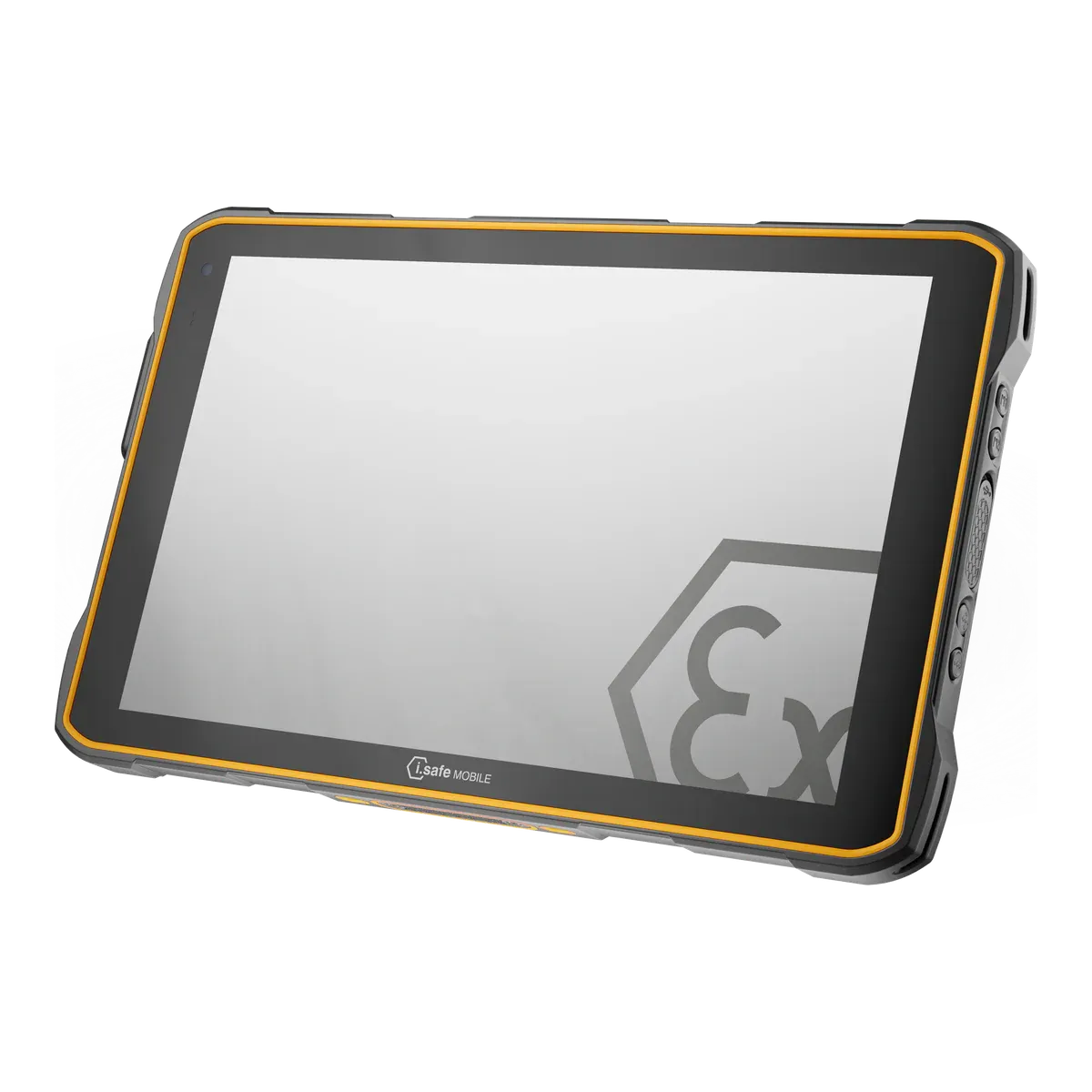 i.safe MOBILE IS940.2 i.safe MOBILE IS940.2 | |
|---|---|---|
| Ex rating | ||
| Certified for | Zone 2/22 | Zone 2/22 |
| Protection | Intrinsic safety (Ex ic) with inherently safe optical radiation (op is) | Intrinsic safety (Ex ic) |
| Gas group | IIC | IIC |
| Temperature class | T4 (≤ 135 °C) | T4 (≤ 135 °C) |
| Certification | ||
| ATEX marking | II 3G Ex ic op is IIC T4 Gc / II 3D Ex ic op is IIIC T135°C Dc IP64 | II 3G Ex ic IIC T4 Gc / II 3D Ex ic IIIC T135°C Dc |
| ATEX certificate | EPS 25 ATEX 1 087 X | EPS 25 ATEX 1 002 X |
| IECEx marking | Ex ic op is IIC T4 Gc / Ex ic op is IIIC T135°C Dc IP64 | Ex ic IIC T4 Gc / Ex ic IIIC T135°C Dc |
| IECEx certificate | IECEx EPS 25.0018X (Issue 0, 2025-08-26) | IECEx EPS 25.0002X (issue 0, 2025-03-31 |
| Other approvals | CE, FCC/IC | IA South Africa, KCs |
| North America | UL (report E321557-20260130; certificates UL-US-26103088-0, UL-US-26103089-0, UL-CA-2675759-0, UL-CA-2675760-0, issued 2026-02-09), North America types B7-T2E1 / B7-T2E3 only: Class I Div 2 Groups A, B, C, D; Class II Div 2 Groups F, G; Class III Div 2; T4. Zone 2 AEx ic [op is] IIC T4 Gc; Zone 22 AEx ic [op is] IIIB T135 °C Dc (CEC: Ex ic [op is] IIC T4 Gc X / IIIB T135 °C Dc X). Zone 22 is group IIIB under NEC/CEC, not IIIC. | NEC 500: Class I Div 2 Groups A, B, C, D T4; Class II Div 2 Groups F, G 155 °C; Class III |
| Protection level (EPL) | Gc / Dc | Gc / Dc |
| Dust group | IIIC | IIIC |
| Max surface temperature (dust) | 135 °C | 135 °C |
| Safe use | ||
| Ambient temperature (Ta) | −20 °C to +55 °C | −20 °C to +55 °C |
| Charging | Outside the hazardous area only | Yes |
| Battery swap | Outside the hazardous area only | Outside the hazardous area only |
| Ports and accessories in the zone | Ports (USB-A, USB-C, dock, keyboard connector) only if the atmosphere is shown to be absent; charging accessories are required but not included. | USB-C and 16-pin ISM covers closed in Ex areas; the 12-pin dock interface may stay open and the IS-DS940.1 dock or approved accessories may be connected there. 16-pin ISM accessories only outside Ex areas unless listed as approved for Ex-area use (headset, PTT button). |
| Certified accessories | Named in IECEx EPS 25.0018X as 'accessories for use in hazardous areas': battery B7-T2Z0-0001 (3.8 V / 8920 mAh), kickstand with hand strap B7-T2Z0-0003, hand strap B7-T2Z0-0004, shoulder strap B7-T2Z0-0006, screen protector B7-T2Z0-0008, stylus holder B7-T2Z0-0009, leather holster B7-T2Z0-0010, stylus 17-S1Z0-0008. Battery changing and charging only outside hazardous areas; charging accessories are for use outside hazardous areas. | As IS-940.1: IS-HS2A.1, IS-PTTB1A.1, IS-HDHS1x.1 headsets, IS-DS940.1 dock, multi charger, leather cases, vehicle mount. |
| IP code in the Ex certificate | IP64 (marking) | Not in our data |
| Operating temperature | −20 °C to +55 °C | −20 °C to +55 °C |
| Conditions of use | IECEx X conditions: battery pack changed or charged only outside hazardous areas; only battery pack type B7-T2Z0-0001/**** shall be used; connection or disconnection of external ports, opening the enclosure or replacing the battery while live only if the atmosphere is shown to be absent; protect from high-energy impacts and high electrostatic charge; follow the manufacturer's safety instructions strictly. Ambient −20 °C to +55 °C. | Battery may be replaced outside explosion hazardous areas only; protect against excessive UV light and high electrostatic charge; USB-C interface under IP cover opened only outside hazardous areas; 16-pin ISM interface closed with cover when not in use in hazardous areas; ambient −20 °C to +55 °C; charging temperature 0 °C to +45 °C (IECEx EPS 25.0002X). Safety instructions: only zones 2/22. |
| Device | ||
| Type | Rugged tablet, Ex version | Dedicated Ex tablet |
| Launched | 2025Unconfirmed, see note 2 | 2025Unconfirmed, see note 3 |
| Part numbers | B7-T2E*-************ (B7-T2E2 rest of world; B7-T2E1 North America) | Model M940A01; battery BPIS940A.2A per DoC |
| Operating system | Android 14 | Android 14 |
| Edition | Android 14 with Zebra Mobility DNA / LifeGuard | Android 14 |
| OS upgrades | Android 16 (BARTEC datasheet: 'upgradeable to Android 16') | Not in our data |
| Security updates | Until December 2031Unconfirmed, see note 1 | Until Q4 2032 |
| Processor | Qualcomm 6490 (QCM6490) octa-core 2.7 GHz | Qualcomm QCM6490 octa-core (long-term support chipset) |
| Processor architecture | Arm | Arm |
| Memory (RAM) | 8 GB | 8 GB |
| Storage | 128 GB, microSD (up to 2 TB) | 128 GB, microSD supported |
| Field capabilities | ||
| Push-to-talk | Via app (programmable keys; PTT app) | Via accessory (IS-PTTB1A.1 PTT button on the 16-pin ISM interface; Ex-rated? yes) and PTT app |
| Emergency / SOS | Via app (three programmable keys, no dedicated SOS key) | Built in (freely programmable red key, e.g. SOS / lone worker) |
| Lone worker | Via app (third-party application) | Via app (red key assigned to a lone-worker application; third-party app) |
| Barcode scanning | Built in (optional SE55 1D/2D Advanced Range scan engine; changes the Ex marking to 'op is') | Via app (50 MP camera-based; no dedicated scan engine listed) |
| NFC reading | Built in (NFC) | Built in (NFC) |
| 3D scanning / LiDAR | Not possible (no depth sensor listed) | Not possible (no depth sensor listed) |
| High-accuracy GNSS | Built in (ET65 only: dual-band L1 + L5 GNSS) | Not in our data |
| Remote expert / video calls | Via app (rear and front cameras, privacy shade; third-party app) | Via app (front and rear cameras, Wi-Fi 6 / 5G; third-party app) |
| Windows desktop software | Not possible (Android) | Not possible (Android) |
| Display and camera | ||
| Display | 10.1-inch Optically bonded, multi-mode capacitive touch, Corning Gorilla Glass | 10.1-inch Corning Gorilla Glass V3 (3rd generation), usable with gloves |
| Resolution | 1920 × 1200 (WUXGA; page prints '1900 × 1200')Unconfirmed, see note 4 | 1200 × 1920 |
| Brightness | 1000 nits | Not in our data |
| Outdoor readability | Optically bonded 1000 nit display (maker: easy to view in sunlight) | Not in our data |
| Touch | Bare or gloved fingertip or stylus input | Usable with gloves (maker); wet-touch not stated |
| Pen / stylus | Stylus supported | Passive stylus available as accessory (IS-Stylus Set, 'stylus for operating touch screens'); not in the box |
| Rear camera | 16 MP autofocus with LED flash | 50 MP autofocus |
| Front camera | 8 MP with mechanical privacy shade | 5 MP fixed focus |
| Connectivity | ||
| Network | ET60 Wi-Fi 6E; ET65 adds 5G FR1 / 4G / 3G, private 5G/CBRS | 5G NR and 4G LTE |
| Wi-Fi | Wi-Fi 6E (802.11ax) 2x2 MU-MIMO | Wi-Fi 6 (802.11 a/b/g/n/ac/e/k/r/ax/v) with hotspot |
| Bluetooth | Bluetooth 5.2 Class 1 + LE | Bluetooth 5.2 |
| NFC | Yes (ISO 14443 A/B, FeliCa, ISO 15693) | Yes |
| Satellite positioning | ET65: GPS, GLONASS, Galileo, BeiDou, QZSS dual-band L1+L5 | GPS, A-GPS, Glonass, A-Glonass, Beidou, Galileo |
| SIM | ET65: eSIM + nano-SIM | Nano-SIM + eSIM (dual SIM) |
| Physical and power | ||
| Weight | 1074 g | 1059 g |
| Dimensions | 275 × 199 × 18.3 mm | 266.0 × 168.6 × 19.5 mm |
| Ingress protection | IP64Unconfirmed, see note 5 | IP68 |
| Ruggedness | 1.5 m drop to concrete, exceeds MIL-STD-810H | MIL-STD-810H |
| Battery | 8920 mAh | 8160 |
| Battery energy | 36Unconfirmed, see note 6 | 30.2Unconfirmed, see note 7 |
| Battery life | Up to 10 h indoor with standard battery (WLAN on, 50 % backlight) | Not in our data |
| Hot-swap battery | Yes (internal supercapacitor keeps power during battery swaps) | Not in our data |
| Replaceable battery | Yes | Yes |
| Ports and expansion | 2 x USB 3.1 Type A; 1 x USB 3.1 Type C (DisplayPort 1.2); docking connector; keyboard connector; 1 x USB 2.0 (rear); optional SE55 scan engine | USB-C; 12-pin docking interface; 16-pin ISM interface (audio/PTT accessories; the page text also calls it '13-pin'); nano-SIM + eSIM; microSD |
| Docking | Docking connector (charge and data); vehicle and desk accessories in BARTEC accessory sheet | IS-DS940.1 docking station (VESA 100; charging in Ex area); IS-MC930.1 six-bay multi charger; vehicle mount |
| Keyboard | Keyboard connector for accessories (not 2-in-1) | No (slate) |
| Controls & Accessibility | ||
| Keys | Power, scan, up/down (volume or brightness), three programmable keys | Freely programmable red key (e.g. lone worker / SOS); additional programmable side buttons |
| Push-to-talk key | No | No |
| Glove touch | Yes | Yes |
| Fleet and support | ||
| Manufacturer | BARTEC GmbH, Germany | i.safe MOBILE GmbH, Germany |
Only values we could check are listed; “Not in our data” means we have not verified it, not that the tablet lacks it. A numbered marker means a value is unconfirmed, and the matching note at the foot of the page explains why. Prices are on request for both.
Keep researching
Impartial advice
Both tablets are certified for Zone 2/22 with a Division 2 listing, so the choice comes down to charging, scanning and how your crews work. Tell us about your sites and we will help you choose impartially, or check whether a Zone 1 tablet would suit better.
FAQ
Neither is better across the board. The i.safe MOBILE IS940.2 suits crews who charge in the zone, lone workers and teams who need photos. The BARTEC ET60/65EX2 Android suits scan-heavy rounds with its optional built-in scan engine and a hot-swap battery. Both are certified for Zone 2/22 and Class I Division 2.
No. Both are intrinsically safe (Ex ic) and certified to protection level Gc, which covers Zone 2 only, so neither is for Zone 1 or Zone 0. The Zone 1 version of the i.safe is the i.safe MOBILE IS940.1, which also works in Zone 2.
Only the i.safe MOBILE IS940.2, within the certificate’s conditions, at 0 °C to +45 °C and through its dock interface. The BARTEC ET60/65EX2 Android must be charged outside the hazardous area. Both have their batteries changed outside it.
The BARTEC ET60/65EX2 Android, if you specify the optional SE55 1D/2D scan engine, which is built in and changes its Ex marking to “op is”. The i.safe MOBILE IS940.2 scans with its 50 MP camera through an app and lists no dedicated scan engine.
Only the i.safe MOBILE IS940.2 has a confirmed date in our data: i.safe states Q4 2032. For the BARTEC ET60/65EX2 Android our data shows December 2031, which is Zebra’s date for the tablet it is built on, and BARTEC says it needs a LifeGuard service contract, so treat it as unconfirmed.
Both have Division 2 approvals in our data, with limits. The BARTEC ET60/65EX2 Android has a UL listing for the US and Canada covering Class I Division 2 Groups A to D at T4, for the B7-T2E1 and B7-T2E3 types only. The i.safe MOBILE IS940.2 lists NEC 500 Class I Division 2 Groups A to D at T4, and also Class II Division 2 Groups F and G and Class III; our data does not show a Canadian listing for it, so ask i.safe if you work in Canada.
Prices depend on volume, configuration and region, so both are on request. Contact us for a price.
Facts last verified on against certificates, declarations of conformity and manufacturer data. The sources for each tablet are listed on its page: BARTEC ET60/65EX2 Android and i.safe MOBILE IS940.2. Always check the certificate for your exact model before use. Spotted an error? Tell us.